Chapter 3: Processes
Interview Questions
This chapter answers to the following questions:
- What does free -h show and what does each column mean?
- What is the relationship between virtual and physical RAM in Linux?
What Does free -h Show and What Does Each Column Mean?
The free -h command is one of the most common tools in Linux for checking system memory usage. The -h flag stands for human-readable — it converts raw kilobyte values into Mi (mebibytes) or Gi (gibibytes) so the output is immediately scannable.
free -h
               total        used        free      shared  buff/cache   available
Mem:           15Gi       4.2Gi       2.1Gi       120Mi       9.1Gi        11Gi
Swap:           2.0Gi       256Mi       1.7Gi
The Rows
| Row | What it represents |
|---|---|
| Mem | Physical RAM — the actual memory chips installed in the machine |
| Swap | Swap space on disk used as overflow when physical RAM is full |
The Columns
| Column | Meaning |
|---|---|
| total | Total installed RAM (minus a small amount reserved by the kernel at boot) |
| used | Memory actively consumed by running processes and the kernel. Calculated as: used = total - free - buffers - cache |
| free | RAM that is completely empty — no data in it at all |
| shared | Memory used by tmpfs filesystems and shared memory segments between processes |
| buff/cache | Memory the kernel is using as buffers (raw disk block staging) and cache (recently read file data kept in RAM to avoid re-reading from disk). The kernel reclaims this instantly when an application needs more memory |
| available | The kernel’s estimate of how much memory a new process can actually use right now — free RAM plus the reclaimable portion of buff/cache |
Why free Looks Low but the System Is Fine
Linux deliberately fills idle RAM with page cache. An almost-zero free value on a healthy system is normal — it means the kernel is doing its job. The buff/cache column holds memory that looks “used” but is actually available on demand.
⚠️ THE GOLDEN RULE OF LINUX RAM
When checking whether a system is running out of memory, look at the
availablecolumn, not thefreecolumn.availableaccounts for reclaimable cache and gives the true picture of how much memory a new process can get. Ifavailableapproaches zero, the system will start swapping or the OOM killer will activate.
Practical Commands
free -h                        # human-readable snapshot
free -h -s 2                   # refresh every 2 seconds (like watch)
watch -n 1 free -h             # same with watch

cat /proc/meminfo | grep -E "MemTotal|MemFree|MemAvailable|Cached|SwapFree"
MemAvailable in /proc/meminfo is the same value as available in free -h — it is the authoritative number the kernel publishes for monitoring tools to use.
💡 Interview tip: If asked “how do you check memory on Linux?”,
free -his the quick answer — but the strong follow-up is explaining which column to read. Pointing toavailable(notfree) and explaining that page cache is reclaimable shows you understand how Linux memory management actually works rather than just knowing the command.
References
What is the Relationship Between Virtual and Physical RAM in Linux?
Every process on Linux lives inside a virtual address space — a private, flat range of addresses that the process treats as its own memory. But virtual addresses are not physical RAM. Physical RAM is a finite hardware resource shared across all running processes, the kernel, and its caches. The Linux memory manager, together with the CPU’s Memory Management Unit (MMU), maintains the translation between the two.
Two Layers of Memory
| Layer | What it is | Who sees it |
|---|---|---|
| Virtual address space | A per-process illusion of private memory, spanning up to 128 TiB on a 64-bit system | The process |
| Physical RAM | The actual DRAM chips on the motherboard — a single shared resource | The kernel and hardware |
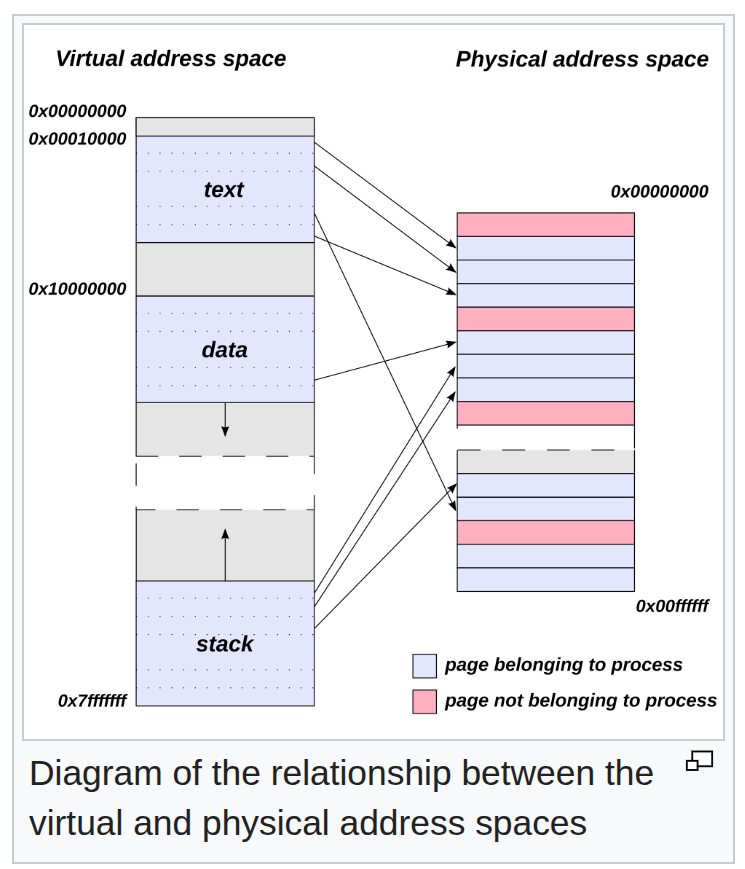
Source: Virtual address space — Wikipedia
A process never accesses physical RAM directly. Every memory access the process makes goes through the MMU, which translates the virtual address to a physical address in real time using a data structure called the page table.
✍️ PAGE TABLE
A page table is a kernel-maintained data structure that maps a process’s virtual page numbers to physical page frame numbers. Every process has its own page table. When the process reads or writes a virtual address, the MMU walks the page table to find the corresponding physical frame. If no mapping exists yet, a page fault fires and the kernel allocates a physical page and installs the mapping before resuming the process.
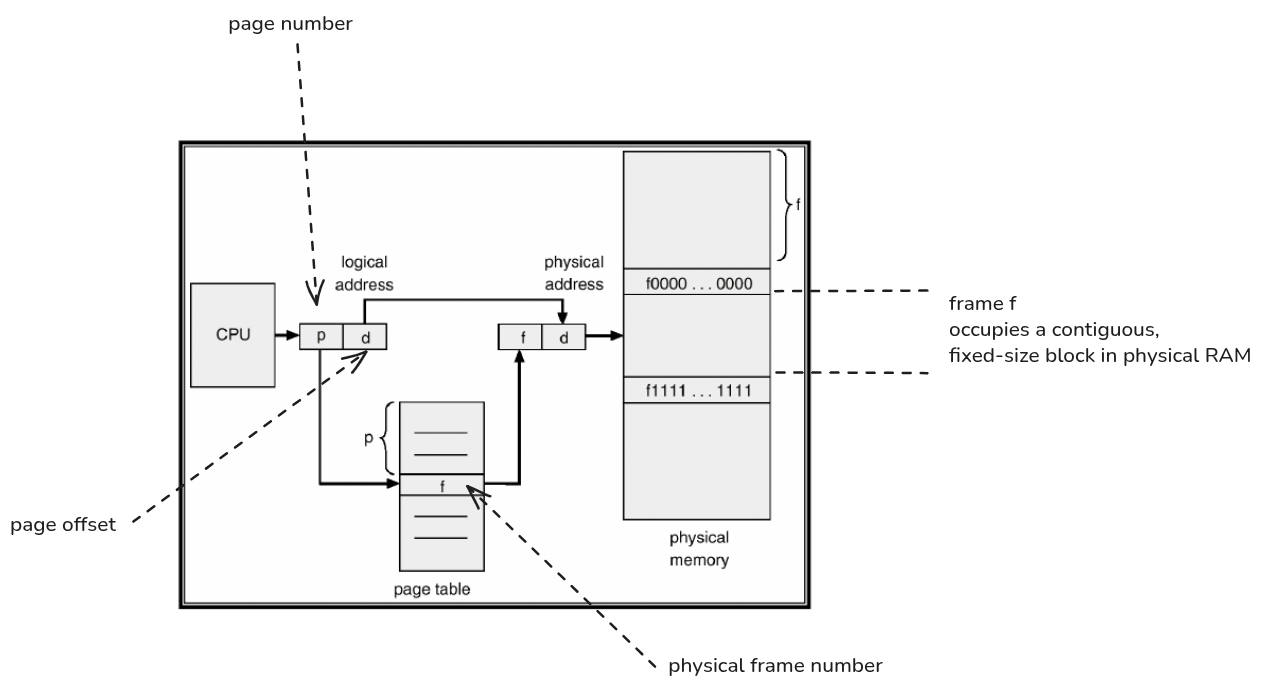
Source: Page vs Page Table Entry — cs.stackexchange.com
Pages and Frames
Memory is managed in fixed-size blocks:
| Term | What it is | Size |
|---|---|---|
| Page | A fixed-size chunk of virtual address space | 4 KiB (default on x86-64) |
| Frame | A fixed-size chunk of physical RAM | 4 KiB (matches page size) |
The kernel maps pages to frames one at a time. A virtual page may be:
- Mapped to a physical frame (the process has accessed it)
- Unmapped (allocated but never touched — no frame consumed yet)
- Swapped out (frame reclaimed, contents saved to disk)
How Translation Works at Runtime
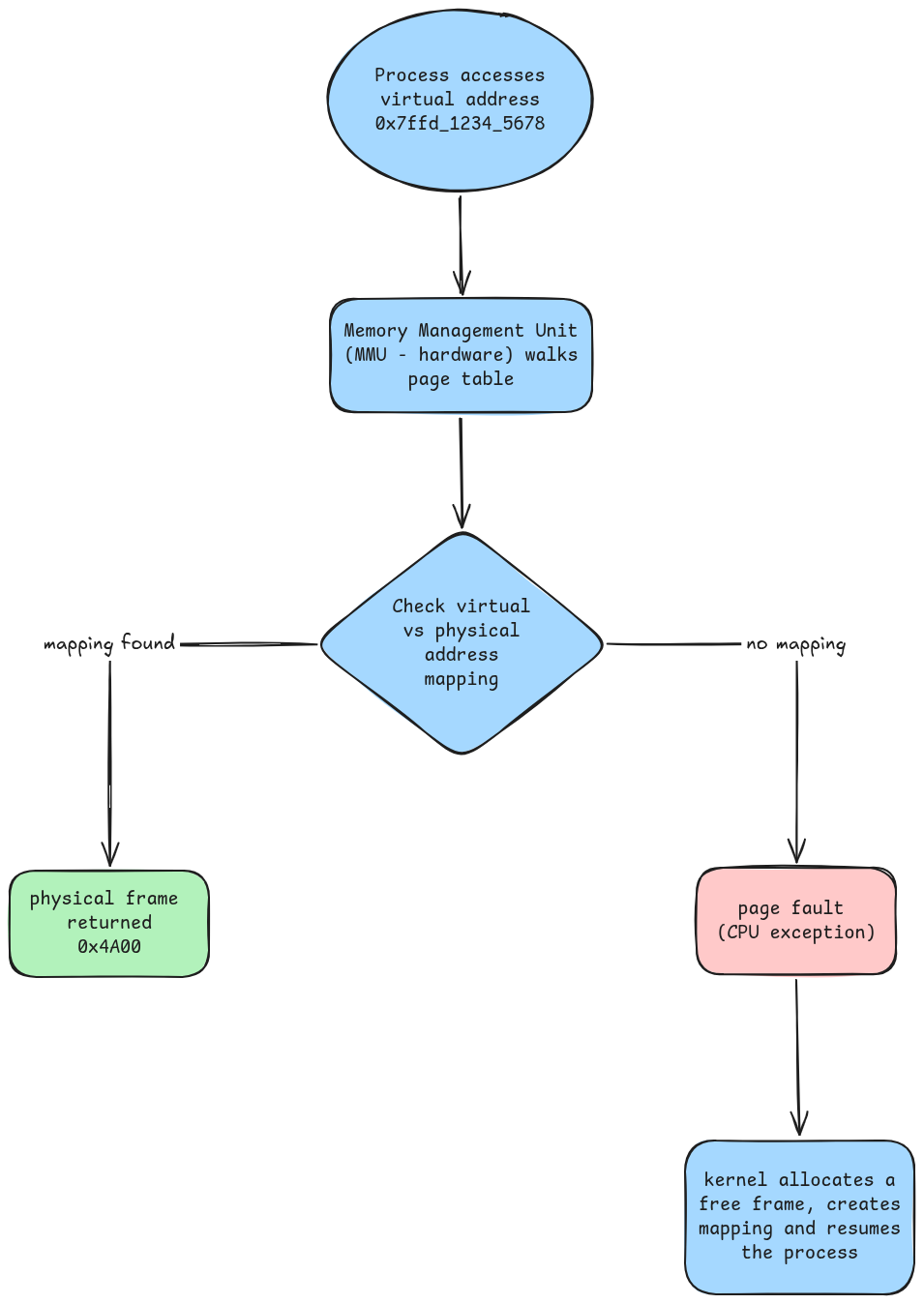
The TLB (Translation Lookaside Buffer) is a small cache inside the CPU that remembers recent virtual –> physical translations so the MMU does not have to walk the full page table on every access.
✍️ TLB — TRANSLATION LOOKASIDE BUFFER
The TLB is a small, fast cache built into the CPU that stores recently used virtual-to-physical address translations. On each memory access, the CPU checks the TLB first. A TLB hit returns the physical address in one cycle. A TLB miss forces a full page table walk (several memory accesses), then caches the result. When the OS switches to a different process (with a different page table), it flushes the TLB — this is one reason process context switches cost more than thread context switches, where the page table (and TLB entries) are shared.
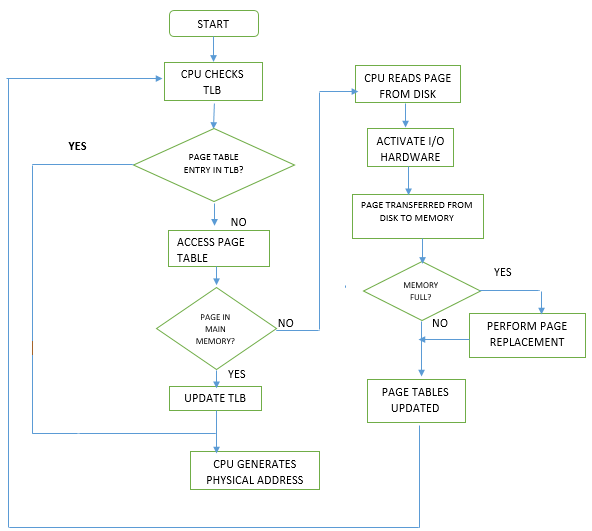
Source: Translation lookaside buffer — Wikipedia
Why Virtual Memory Is Larger Than Physical RAM
On a 64-bit system each process gets up to 128 TiB (1 Tebibyte = 1024 GB) range of virtual address space. A machine with 16 GiB of RAM can run dozens of such processes simultaneously because:
- Not all virtual pages are backed by physical frames. Memory is only faulted in page-by-page as the process actually writes to it (demand paging).
- Physical frames are shared for read-only data. The kernel maps the same physical frame for identical read-only pages — for example, all processes running the same binary share a single copy of its code in RAM.
- Frames can be reclaimed and reused. The kernel can evict cold pages to swap or discard clean cache pages, freeing frames for other processes.
Observing the Difference
# Virtual vs physical memory for a process (PID 1234)
cat /proc/1234/status | grep -E "VmSize|VmRSS|VmSwap"
| Field | Meaning |
|---|---|
VmSize | Total virtual address space reserved by the process |
VmRSS | Resident Set Size — physical frames currently mapped (actual RAM in use) |
VmSwap | Pages that were in RAM but have been moved to swap |
On a typical system VmSize is 10-100x larger than VmRSS. The gap is virtual pages that have been reserved but never touched, or pages that were evicted to swap.
# System-wide view
free -h                        # physical RAM: used vs available
cat /proc/meminfo | grep -E "VmallocTotal|VmallocUsed"   # kernel virtual alloc pool
💡 Interview tip: The key insight is that virtual and physical memory are completely separate concepts connected only by the page table. A process can have 10 GiB of
VmSizewith only 200 MiB ofVmRSS— the rest is virtual reservation with no physical backing yet. Mentioning the MMU, page faults, and TLB shows you understand the hardware layer, not just the OS API.